Concepts
Offsets
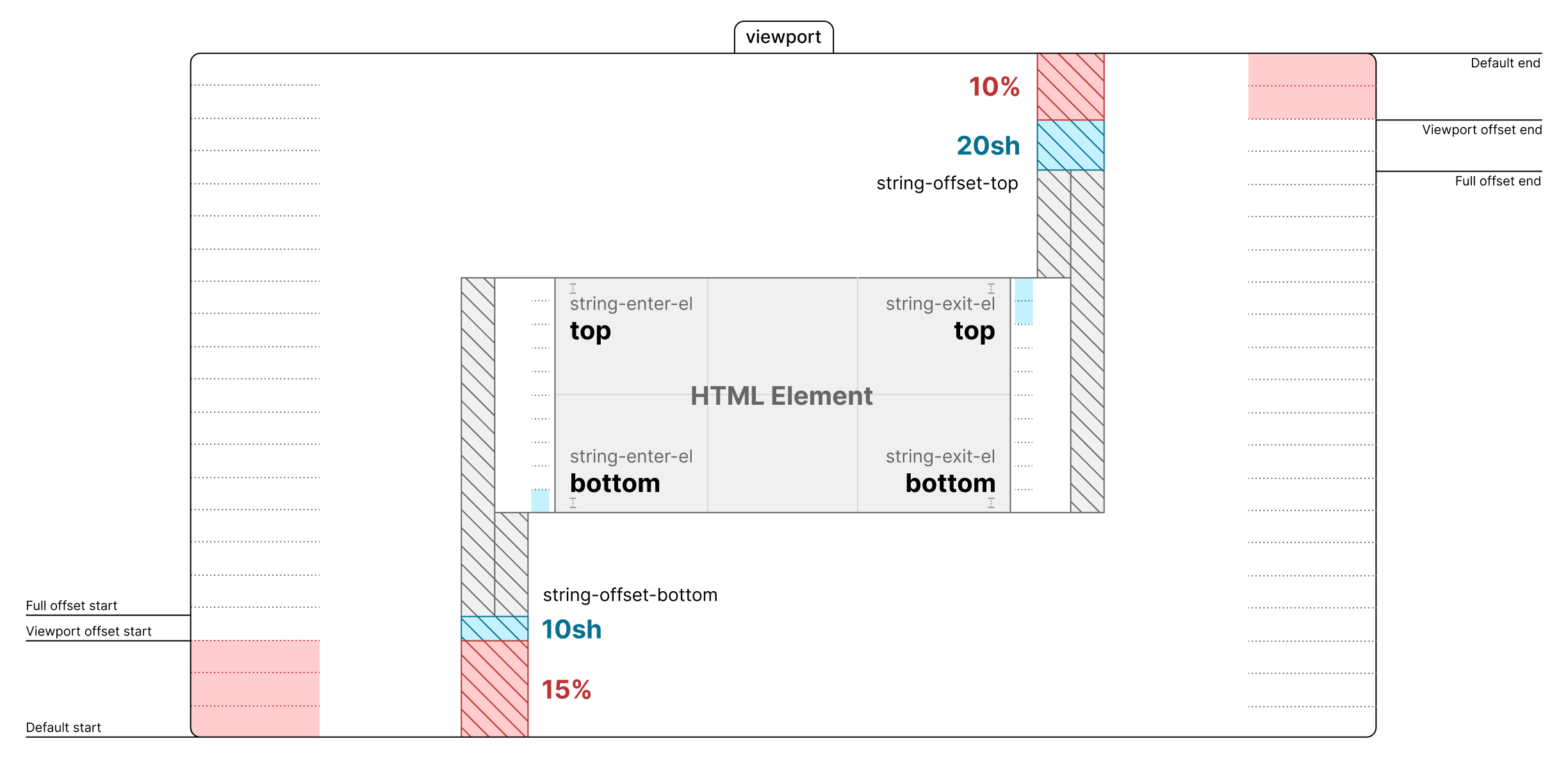
Viewport geometry, start and end zones, and how offset inputs affect progress-oriented modules.
Offset Concepts
Offsets in StringTune give you precise control over when scroll events are triggered as elements enter or leave the viewport. By configuring offsets and control points, you can fine-tune scroll-based animations and interactions to match any UI/UX scenario.
Core Principle
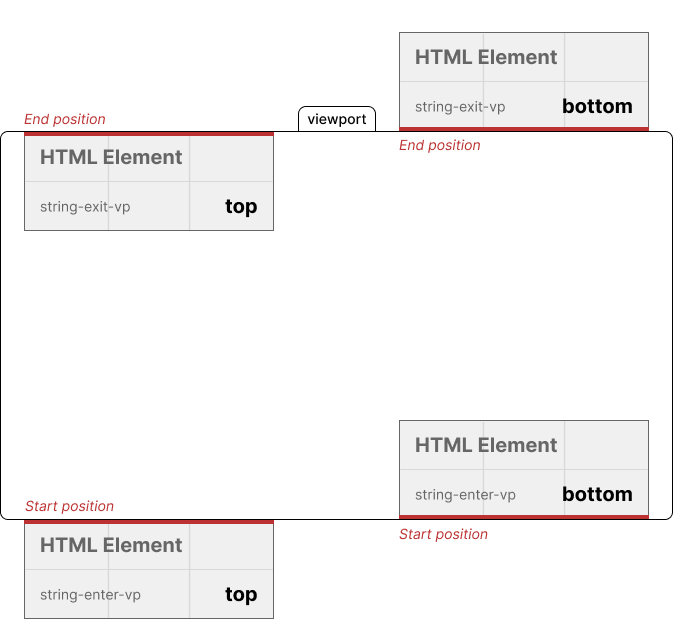
A scroll trigger is always defined as the meeting of two control points:
- One control point is on the element (e.g., its top or bottom edge)
- One control point is on the viewport (e.g., its top or bottom edge)
A trigger fires when these two control points coincide during scrolling.
You select these control points using attributes:
string-enter-el,string-exit-el— set the element’s control point (e.g.,"top"or"bottom")string-enter-vp,string-exit-vp— set the viewport’s control point (e.g.,"top"or"bottom")
What Is an Offset?
An offset shifts the meeting point of these control points, allowing triggers to fire before or after the default intersection.
- Positive offset: The element must travel further into the viewport before the event fires.
- Negative offset: The event fires earlier, before the element’s edge even reaches the viewport control point.
Offsets can be set in:
px— pixels%— percent of viewport heightsh— percent of the element’s own height (self height)
How Offsets Are Calculated
All offset values are converted to pixels for calculation, depending on their unit:
25sh— 25% of the element’s height-10%— 10% of the viewport height, before the edge50px— 50 pixels
Offsets are always measured from the relevant viewport control point, in the direction the element moves through the viewport.
Practical Examples
Example 1: Positive Offset (delay the trigger)
<div string-enter-el="top" string-enter-vp="top" string-offset-top="25sh">
  <!-- ... -->
</div>
Meaning: The trigger fires when the element’s top edge is 25% of its own height past the top edge of the viewport. In other words, the element must move further inside the viewport before the trigger fires.
Example 2: Negative Offset (early trigger)
<div string-exit-el="bottom" string-exit-vp="bottom" string-offset-bottom="-10%">
  <!-- ... -->
</div>
Meaning: The trigger fires when the element’s bottom edge is 10% of the viewport height before reaching the bottom edge of the viewport. This allows the event to fire early, before the element fully leaves the viewport.
Offset Control Points: Table
| Attribute Pair | Trigger fires when... |
|---|---|
| enter-el="top" + enter-vp="top" | Top of element meets top of viewport |
| exit-el="bottom" + exit-vp="bottom" | Bottom of element meets bottom of viewport |
| enter-el="top" + enter-vp="bottom" | Top of element meets bottom of viewport |
| exit-el="bottom" + exit-vp="top" | Bottom of element meets top of viewport |
- Add offsets to shift the trigger further inside or outside the viewport.
Offset Units: Table
| Unit | Example | What it means |
|---|---|---|
| px | 50px | 50 pixels from the control point |
| % | 10% | 10% of viewport height from the control point |
| sh | 25sh | 25% of the element’s own height from the control point |
- Positive values: further inside the viewport
- Negative values: before reaching the viewport control point
Visual Explanation
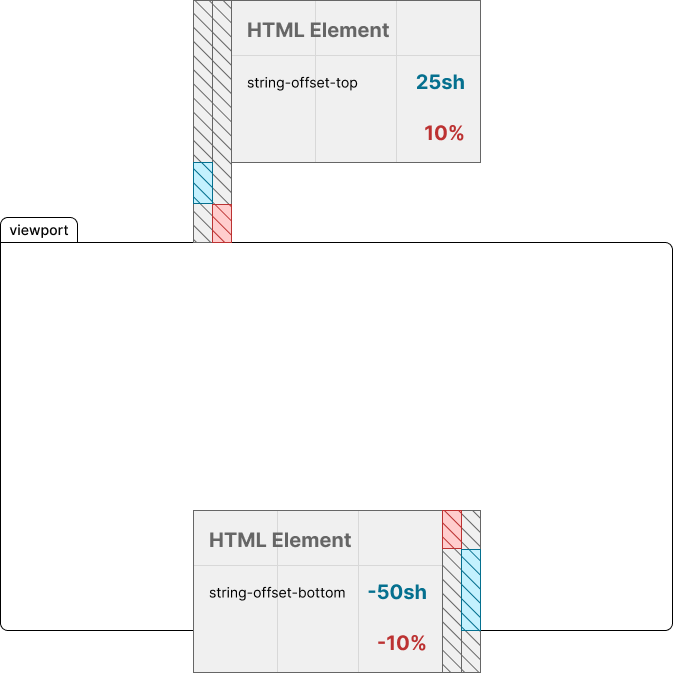
The blue area shows a positive offset (element must move further inside the viewport). The red area shows a negative offset (trigger fires before reaching the viewport edge). “sh” means a percent of the element’s own height, “%” means a percent of the viewport height.
- Positive offsets: trigger happens after the element has moved further inside the viewport
- Negative offsets: trigger happens before the element reaches the viewport edge
Best Practices
- Use
shfor responsive elements with dynamic height - Use
%for layouts that depend on viewport size - Combine control points and offsets for advanced scroll behaviors
- Always check which control points you are using — this defines the logic of your scroll triggers!
Common Pitfalls
- Don’t assume offsets are always relative to the element’s edge. Offsets always shift the meeting point between the element’s control point and the viewport’s control point.
- Mixing up positive and negative offsets: Remember, positive means “further inside”, negative means “before”.
In Summary
- Every scroll trigger is defined by a pair of control points (element and viewport)
- Offset shifts this meeting point, allowing early or delayed triggers
- Be explicit about which control points and units you are using for predictable scroll behaviors